Pool, spa & outdoor living
Heat the spa & turn on the jets
First, open the Pool Attendant app
The steps below are for the Pool Attendant app, which controls the pool, spa and yard lights. Choose whichever is easiest:
Use the kitchen iPad: Open the Pool Attendant app on the iPad in the kitchen, available for guests to use.
Use your own phone: Follow our download and setup instructions for Pool Attendant, then return to this page.
Already have the app set up? Open it and follow the spa steps below.
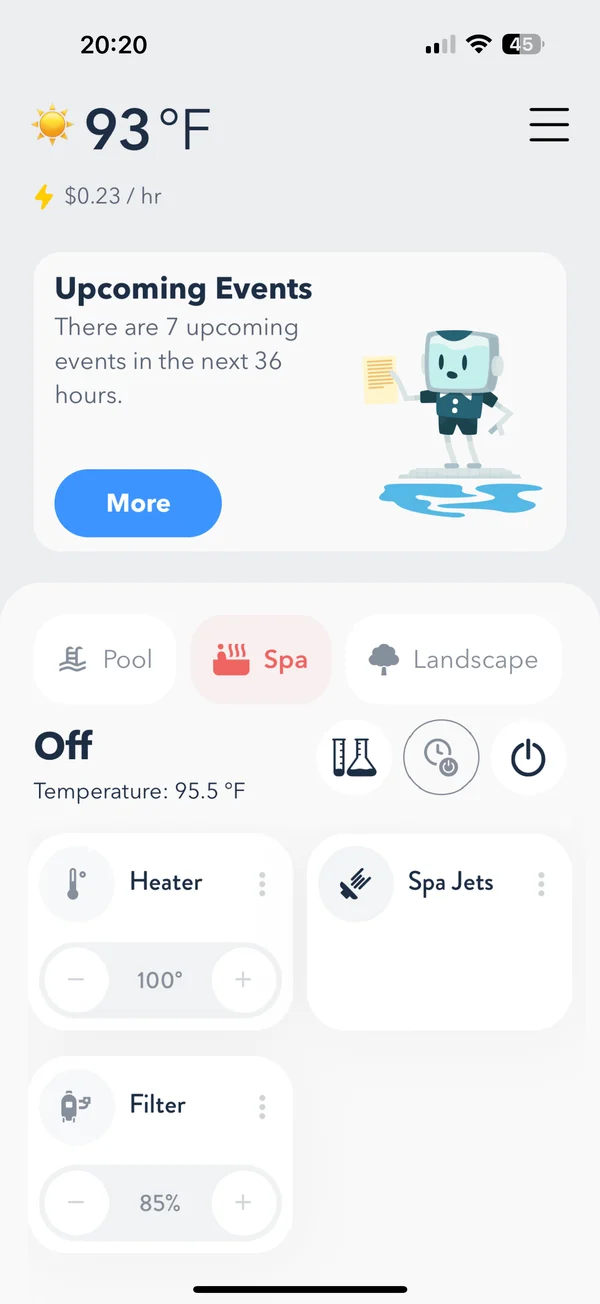
In the app: heat the spa & turn on the jets
When using the spa heater, the main pool filter and waterfalls will turn off and will focus on heating the spa only:
- Tap the Spa button (middle of the screen).
- Tap the button to the left of Filter to turn on the spa filter. You may receive a notification that the pool filter must be turned off if it is on. If so, proceed with turning the pool filter off. Do NOT adjust the % setting under Filter.
- Tap the button to the left of Heater to turn on the heater. Adjust the temperature using the + or – buttons. To turn off the spa heater, tap the button to the left of Heater again.
- To turn on or off the spa jets, tap the button to the left of Spa Jets. (Heater does not need to be on for jets to work.)